
Your first music video, in minutes
Upload your song, add your artist and pick a vibe. Shot plans every scene on the beat, shows you a preview and the cost, then renders the final in HD or 4K — with vertical cuts for reels.
What you get with the Shot Studio
Three taps to your first video
Song, photo, vibe. Shot does the planning, the shot list and the edit — you approve and tweak.
An editor that hears the music
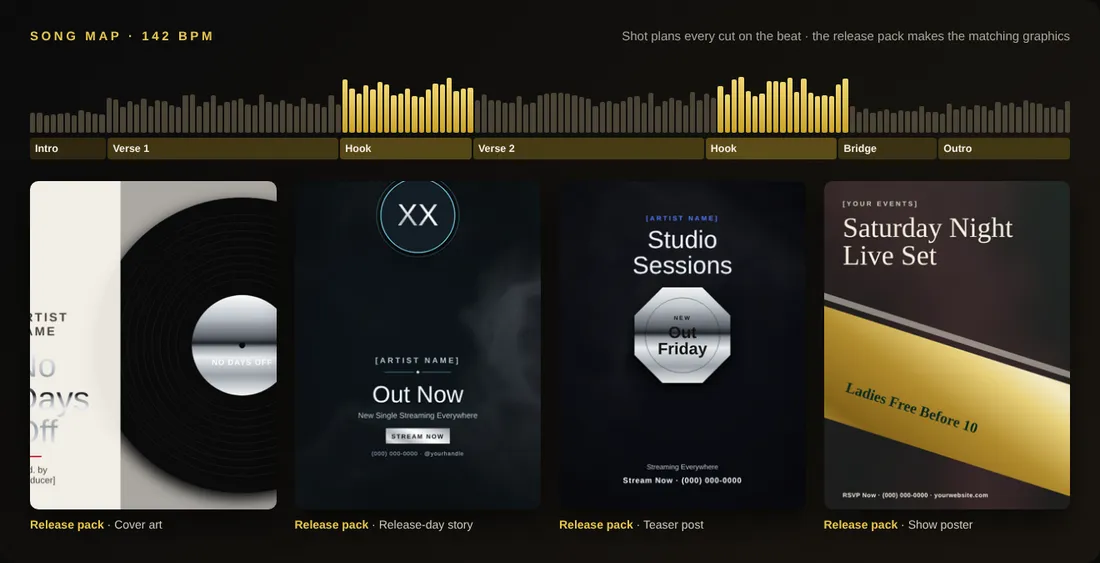
Song mapping finds the beat, verses, hooks and drops. Cuts land on the beat, move faster on the hook, breathe on the verse.
Performance on the hook
Lip-synced close-ups of your artist land on every chorus, with story scenes in between — the way real videos are cut.
Preview first, pay once
Cheap previews of every scene before the final render. Re-render one scene that’s off instead of the whole video. The token cost is shown before you click.
Two takes, best one wins
On Studio and Label, Shot renders two versions of each scene and keeps the sharper one with the better face — you can swap any time.
HD and 4K, any shape
720p previews, 1080p HD and 4K upscaling. Widescreen for YouTube and TV, plus automatic 9:16 cuts for reels and stories.
Four modes
Music video, commercial, skit and movie — each with its own guided brief, from a 15-second ad to a short film.
Your cast, every outfit
Save artists and actors with their looks and voices, switch outfits per scene, and keep every face consistent.
Treatment PDF
Before you render, get a professional treatment with mood board, palette and shot list to share with the artist or client.
Planned on the beat, before you spend a token
Shot maps your song — beat, verses, hooks and drops — then writes the shot list and renders cheap previews. You see the cost of the final before you click render, and you only redo the scenes you want.
Why it matters
A music video used to mean a crew, a location and a budget. Shot turns your song, your face and one vibe into a planned, beat-matched video — and you see every scene and its cost before you spend a token on the final.
And because it lives inside DonForge, it shares your Brand Kit, your library and your sign-in with everything else — no exporting between apps, no wrong version going out, everything autosaved so you can pick up right where you left off on any device.
How to get started
- Open Shot and tap “Make my first video”.
- Upload your song (or type your commercial brief) and add a photo of the artist.
- Pick a vibe, review the shot list and watch the quick previews.
- Re-render any scene you want, then render the final in HD or 4K with vertical cuts.
Who uses the Shot Studio
- Independent artists drop a video with every single instead of once a year.
- Local businesses run 15- and 30-second commercials on social and TV.
- Labels and managers produce videos, teasers and release graphics for a whole roster.
- Creators build skit series with the same characters, outfits and voices every episode.
Templates are ready for plumbers, HVAC companies, real estate agents, law firms, salons and rap artists — plus 14 more industries.
Questions about the Shot Studio
How do I make a music video with AI?
Upload your song and a photo of the artist, pick a vibe, and Shot maps the beat, writes a shot list, renders quick previews of every scene and then the final in HD or 4K.
Can AI make a commercial for my business?
Yes. Pick Commercial, type your business, offer and phone number, and Shot writes the script, voices it and renders 15-, 30- or 60-second spots for social and TV.
Can I render in widescreen and vertical?
Yes. Render in 16:9 widescreen and get 9:16 vertical cuts for reels and stories from the same project.
How long can a video be?
Music videos and commercials render as a sequence of short AI scenes stitched on the beat. Movie mode handles short films; longer projects cost more tokens and you see the cost before you render.
Do I own the video?
Videos you render on a paid Shot plan are yours to release, post and monetize.