Auto Detailing invoice templates
A polished invoice for auto detailers, mobile detailing and ceramic coating shops — itemized, branded and ready to send for e-signature. Showroom shine, delivered.
Auto Detailing invoice designs
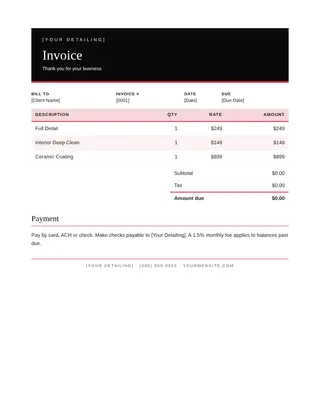
Each auto detailing invoice uses the Gloss Black & Red palette with an elegant serif heading, a tinted line-item table and clear totals. Placeholders like [Client Name] and [Date] fill in automatically when you use a workflow.
Tips for a auto detailing invoice that works
- Number every invoice and include an issue date and a due date.
- Itemize labor and materials separately so customers see the value.
- State your payment methods and terms at the bottom.
- Send it as a PDF — or let customers sign and approve it online.
- Save your filled-in invoice as your own template for next time.
Specs
- Size: US Letter document, export PDF or Word (.docx)
- Best for: billing customers professionally and getting paid faster
- Exports: PDF, Word (.docx), HTML, print
- Includes: auto detailing copy for full detail, interior deep clean, ceramic coating, brand-kit colors and fonts
Why auto detailers, mobile detailing and ceramic coating shops use DonForge
DonForge puts the invoice in the same file as the rest of the job: the estimate, the flyer, the photos and the signed contract. Change your phone number once in the brand kit and every template picks it up. Send a client one link where they can review, comment and sign. When the estimate is approved, a workflow can create the contract and the invoice automatically.
What to include on your auto detailing invoice
- Your business name, logo, license number and contact details in the header.
- The customer’s name, job address and a job or reference number.
- Itemized lines for full detail, interior deep clean, ceramic coating with quantities and rates.
- Subtotal, tax, any deposit received and the balance due.
- Payment terms, accepted methods and a signature line.
Every DonForge auto detailing invoice already has these pieces in place, written for auto detailers, mobile detailing and ceramic coating shops, so you only replace the details. Your brand kit fills in the logo, colors and phone number automatically, and the file autosaves as you work.
FAQ
What size is a auto detailing invoice?
DonForge auto detailing invoice templates are US Letter document, export PDF or Word (.docx). You can resize any design in one click.
Is this auto detailing invoice template free?
Yes. You can open and edit it on the Free plan; exports carry a small watermark until you upgrade to Pro.
Can my customer sign the invoice online?
Yes. Add a Signature section to the file and send it. Your customer signs from any device and you get a signed PDF with a certificate of completion.